

Every growing business hits the same wall: the team is talented, the product is great, but half the workday disappears into copy-paste tasks, manual data entry, and repetitive follow-ups. Workflow automation software solves this by handling repetitive tasks automatically, around the clock.
In this guide, you will learn what workflow automation software is, how it works, which platforms dominate the market in 2026, and how to implement the right automation strategy for your team.
- What workflow automation software does and where it fits.
- The six must-have features to evaluate in 2026.
- How top platforms compare in strengths and trade-offs.
- A practical five-step implementation plan.
- Which business workflows deliver the fastest ROI.


What Is Workflow Automation Software?
Workflow automation software automatically executes sequences of tasks such as moving data, sending notifications, creating records, and triggering actions across tools.
In plain language: you define a process once using trigger, condition, and action logic, and the system runs it every time with consistent output.
- Trigger: The event that starts automation (example: new form submission).
- Action: What happens next (example: create CRM contact and notify owner).
- Condition: Logic branch (example: only route enterprise leads to senior reps).
- Workflow: End-to-end trigger → condition → action chain.
Workflow Automation vs Related Terms
- Workflow Automation Software: Connects SaaS apps through APIs for business teams.
- RPA: Bots that mimic user actions on-screen, often for legacy systems.
- BPA: End-to-end business process automation across departments.
- iPaaS: Integration-focused platform for deeper technical teams.
- AI Automation: LLM-assisted decision logic for unstructured inputs.

Manual vs Automated Workflows
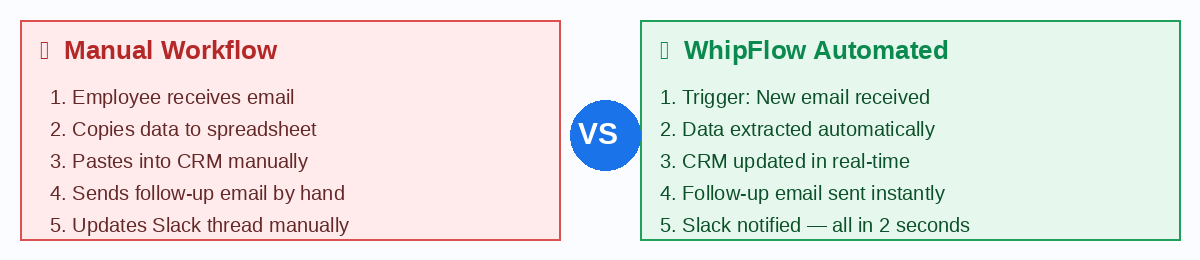
In manual workflows, teams repeatedly copy data between tools, send updates manually, and risk missed steps. In automated workflows, the same result is completed in seconds with higher consistency and fewer errors.
Teams implementing automation report significant time savings. A commonly cited benchmark is around 2.5 hours saved per employee per day in repetitive task reduction scenarios.

6 Must-Have Features in Workflow Automation Software (2026)
- Visual Workflow Builder: Build automations without code and see logic clearly as a process flow.
- Conditional Logic and Branching: Support real-world exceptions with if/then and multi-path routing.
- Wide Integration Library: Connect CRM, support, accounting, project, and communication tools.
- Error Handling and Retry Logic: Detect failures, retry safely, and alert the right owner.
- Real-Time Execution Logs: Audit each run, inspect data flow, and debug quickly.
- Predictable Pricing: Avoid unpredictable per-task cost spikes as usage grows.

Top Workflow Automation Software in 2026
- WhipFlow: Best for SMBs and growing teams seeking usability + value balance.
- Zapier: Best for maximum integration breadth across niche tools.
- Make: Best for visual power users building advanced flows.
- n8n: Best for technical teams and self-hosted workflows.
- ClickUp / Monday.com: Best for project-centric workflow automation.
- Power Automate: Best for Microsoft-first organizations.
- Workato: Best for enterprise-grade orchestration and governance.
WhipFlow: Our Pick for Growing Teams
WhipFlow stands out for small and mid-sized teams by combining an intuitive visual builder, strong branching logic, useful logs, and pricing that scales more predictably for operational use cases.

12 High-ROI Workflows to Automate First
- Sales: Lead capture and CRM routing.
- Sales: Deal stage notifications and handoff alerts.
- Marketing: Blog distribution and social scheduling.
- Marketing: Lead scoring and fast routing logic.
- Customer Success: Onboarding sequences and health alerts.
- Support: Ticket triage, routing, and escalation timers.
- Finance: Invoice generation and payment reminders.
- Finance: Expense approval workflows.
- HR: Employee onboarding account provisioning.
- HR: Leave approval and calendar sync.
- Operations: Weekly KPI reporting automation.
- Operations: SLA monitoring and escalation automation.

How to Implement Workflow Automation Software: A 5-Step Plan
Step 1: Audit repetitive work (Day 1)
List recurring tasks by team. Prioritize tasks that happen weekly, follow the same steps, and require cross-tool updates.
Step 2: Prioritize by time × frequency (Day 2)
Rank automations by manual time cost multiplied by weekly frequency to identify quick, high-impact wins.
Step 3: Map before building (Day 3)
Write each workflow as trigger → condition → action. Document expected outputs and exceptions.
Step 4: Build, test, activate (Days 4–5)
Build in a visual editor, test with real data, validate outputs, then activate and observe for at least 48 hours.
Step 5: Measure and expand (Ongoing)
Track time saved, publish wins internally, assign an owner to each automation, and run monthly improvement reviews.
Frequently Asked Questions
What is workflow automation software used for?
It automates repeatable business processes such as lead routing, ticket handling, onboarding, invoicing, notifications, and reporting.
How much does workflow automation software cost?
Costs range from free tiers to enterprise pricing. Most growing teams can run core automations within affordable monthly plans and see strong ROI.
Do I need technical skills to use it?
Not for modern no-code platforms. Most business users can create workflows with visual builders and guided templates.
What is the best workflow automation software for small businesses?
The best option depends on your stack and workflow complexity. WhipFlow is a strong fit for growth teams, while Zapier is often preferred for broad niche app coverage.
How long does setup take?
Simple workflows can launch in 5–15 minutes. Multi-branch automations may require 1–2 hours including testing and validation.
Is workflow automation secure?
Enterprise-grade vendors typically offer encryption, access controls, SSO options, and audit logs. Always review certifications and data handling standards before rollout.
Can automation replace employees?
Automation replaces repetitive mechanical tasks, not human strategy or relationship work. Teams typically use it to scale output without adding busywork.
Which apps are usually supported?
Most leading tools integrate with CRM, email, chat, spreadsheets, project tools, finance apps, and common API/webhook-based systems.
Conclusion
Workflow automation software is no longer optional for teams that want speed, consistency, and scalable operations. The biggest risk now is delaying implementation while repetitive work keeps compounding.
The best time to automate was yesterday. The second-best time is now.

About the Author
WhipFlow Team helps operations leaders automate day-to-day execution across sales, support, finance, and field workflows.